Tutorial 3 of 6
Bode plots and filters
Intermediate 12 min
Sweep a filter and an amplifier with the Bode plotter, read the −3 dB corner, phase and unity-gain frequency, and see how gain-bandwidth limits an op-amp.
A Bode plot shows how a circuit treats each frequency: the magnitude (gain in dB) and the phase (in degrees) of the output relative to the input. Ohmforge computes it with a small-signal AC sweep. It linearises the circuit around its DC operating point and then solves complex nodal equations at every frequency. Because the sweep starts from a steady state, it has none of the start-up transients you saw on the scope in tutorial 2.
1. The RC low-pass
Open the RC low-pass filter + Bode template and choose the Bode plotter tab:
- Input source: V1. During the sweep it gets an AC magnitude of 1 V, and all other sources become AC-quiet.
- Output net: OUT.
- Relative to: source (1 V). You can pick a node here instead, to get V(out)/V(node).
- From / To / Points/dec: 10 Hz … 1 MHz, 30 points per decade.
Press Sweep.
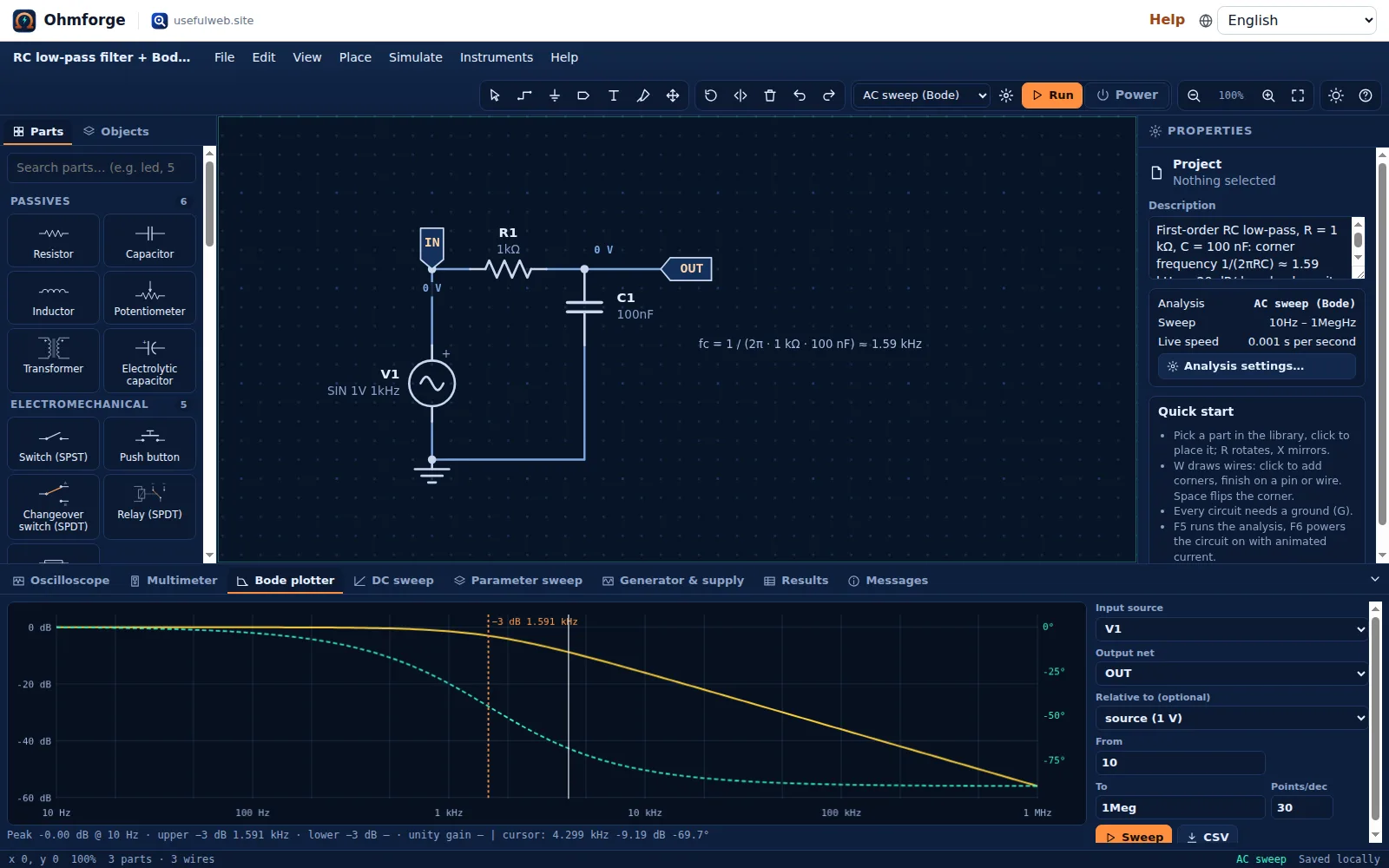
The status line under the plot reads:
Peak -0.00 dB @ 10 Hz · upper −3 dB 1.591 kHz · lower −3 dB — · unity gain —
That matches 1/(2π · 1 kΩ · 100 nF) = 1.5915 kHz. Above the corner, the magnitude falls by 20 dB per decade, which is typical of a first-order filter. At the corner the phase is −45°, and it approaches −90° at high frequencies (the dashed curve, right-hand axis).
The plotter interpolates between sweep points to find the −3 dB frequency, so more points per decade give a more exact corner. The same sweep over MCP with 10 points/decade gives 1.597 kHz, while 20 points/decade give 1.591 kHz.
Try it
- Change C1 to
10nand sweep again. The corner moves up by a factor of ten, to about 15.9 kHz. - Swap R1 and C1 to get a high-pass filter. The plotter then reports a lower −3 dB frequency instead.
- Press CSV to export frequency, magnitude and phase.
2. An op-amp's bandwidth
Open Non-inverting amplifier. It uses a real op-amp model (TL071-like): finite open-loop gain, 3 MHz gain-bandwidth product, supply rails at ±12 V and output headroom. R1 = 1 kΩ and R2 = 10 kΩ set the gain to 1 + R2/R1 = 11.
Sweep from 10 Hz to 10 MHz with V1 as the input and OUT as the output:
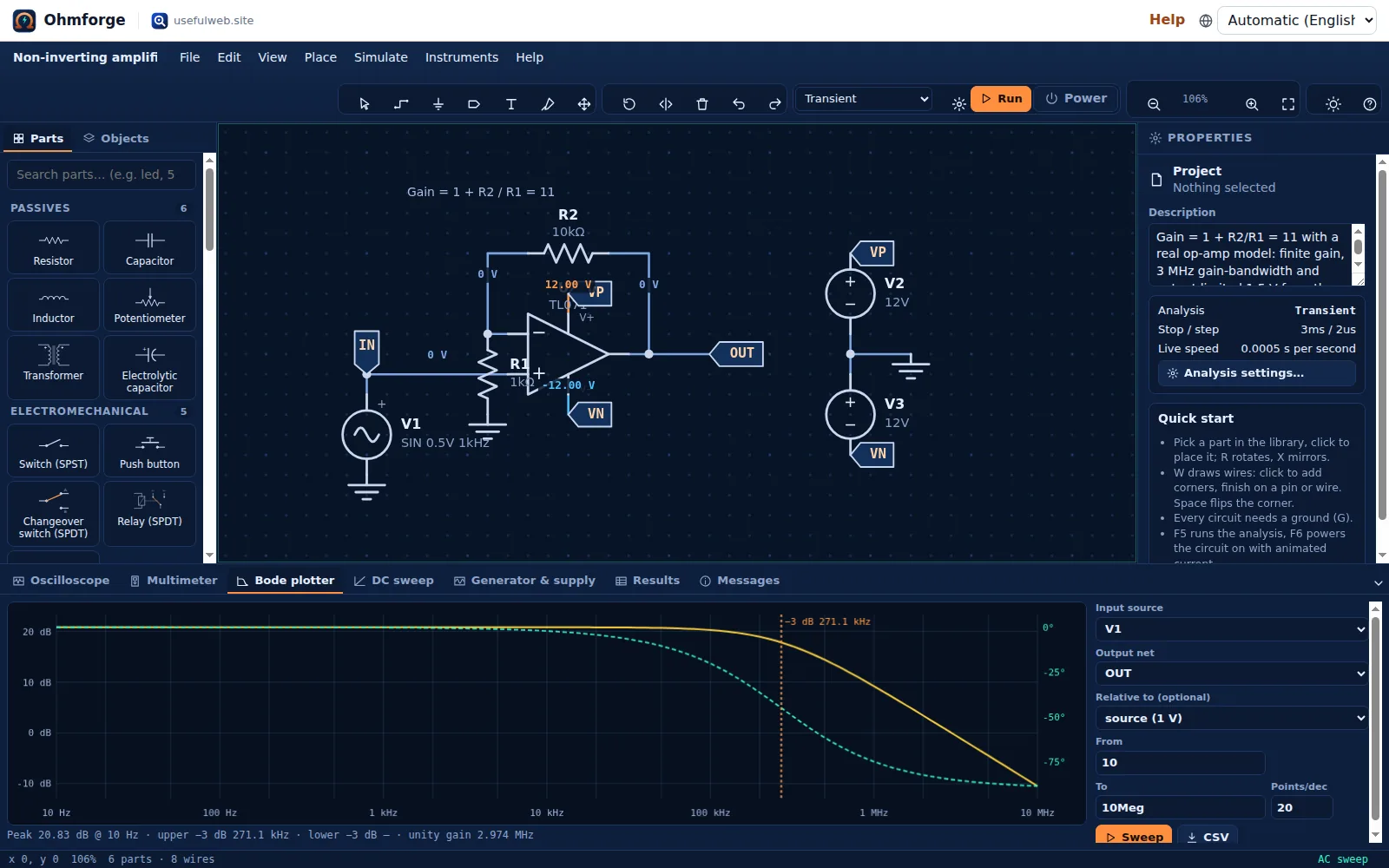
Peak 20.83 dB @ 10 Hz · upper −3 dB 271.1 kHz · lower −3 dB — · unity gain 2.974 MHz
- 20 · log₁₀(11) = 20.83 dB. That is exactly the ideal gain.
- The closed-loop bandwidth is GBW / gain = 3 MHz / 11 ≈ 272.7 kHz, and the plot shows 271.1 kHz.
- Gain falls to 0 dB (unity) near the 3 MHz GBW, as the single-pole model predicts.
Click U1 and raise Gain-bandwidth product in the inspector, or lower the gain by making R2 smaller, and the corner moves accordingly.
Ohmforge offers two op-amp parts. The plain Op-amp (ideal) has a fixed huge gain and no supply pins, which is ideal for learning the textbook rules (its Bode plot is flat). Op-amp (real, with supplies) adds GBW, rails and output limits, so it clips and rolls off like a real chip.
3. Large-signal vs. small-signal
An AC sweep is linear, so it can't show clipping. Set V1's amplitude to 2 V in the non-inverting amplifier: 2 V × 11 = 22 V is above the ±12 V supply. Then compare:
- The Bode plot still says 20.83 dB, because the small-signal gain doesn't change.
- A transient run (
F5in Transient mode) shows the output flattening at ±10.45 V. The model's output stops 1.5 V short of each rail.
The AC tool states the same limit among its assumptions: "Small-signal (linear) analysis around the DC operating point: large-signal effects such as clipping do not appear."
4. DC sweep for transfer curves
The DC sweep tab steps a DC source over a range and plots one net, for example an amplifier's input-to-output transfer curve or a diode's I–V characteristic. You choose Source, Start, Stop, Step and Plot net. If you press F5 in DC sweep mode before choosing, Ohmforge sweeps the first voltage source and plots the named nets, and you can change both afterwards. For an amplifier, the slope of the curve is the gain, and the flat ends show where the output clips.
5. Compare component values with the parameter sweep
How does the corner move when R1 changes? Instead of editing and re-running by hand, open Instruments → Parameter sweep with the RC low-pass loaded and the analysis set to AC sweep (Bode):
- Part is R1 and Parameter is Resistance. Values is pre-filled with half, one and two times the current value:
500 1k 2k. - Plot net is OUT. Press Run sweep.
Ohmforge runs the AC sweep three times and overlays the three magnitude curves, from copper (500 Ω) to cyan (2 kΩ). The table lists the −3 dB corners: 3.182 kHz, 1.591 kHz and 795.8 Hz. Doubling R halves f = 1/(2πRC), as expected.
Values can be a list (1k 2.2k 4.7k), a logarithmic range 1k..100k/5 (five values) or a linear range 0..10/6 lin. The sweep re-runs whatever analysis is selected: transient runs overlay waveforms and list min/max/mean/RMS/frequency, an operating point plots the node voltage against the value, and a DC sweep overlays the transfer curves. CSV exports all runs on one shared x axis.